Collections
Collections are a distribution format for Ansible content. You do know collections from installing additional modules and plugins already, but you can also package and distribute your playbooks, roles, modules, and plugins in a custom collection.
Collection names consist of a namespace and a name, separated by a period (.). Both namespace and name should consist of ASCII letters (prefer lower-case letters), digits, and underscores (hyphens are not allowed). You should not use the following namespaces: ansible, community, local.
Collection or Role?
If you are writing modules/plugins and/or content which should (or can) be used outside of your current project, create a collection!
For example, your project automates the installation and configuration of a database, but you also created role(s) to harden the underlying Linux host. All hardening roles should be moved into a collection.
In most cases, collections make more sense as they are the more flexible distribution format.
A collection can contain one or more roles in the roles/ directory and these are almost identical to standalone roles, except you need to move plugins out of the individual roles, and use the FQCN in some places.
Installing collections
Take a look at the installation section for the recommended installation of collections.
Creating collections
A custom collection does not need much, only a README.md, a galaxy.yml and a meta/runtime.yml with the following content:
You can (and should!) provide additional information in the collection configuration files.
Take a look at the documentation for a complete example and all valid keys for the galaxy.yml or the top-level keys for the runtime.yml.
To scaffold the collection skeleton, either use the ansible-galaxy (simple and slightly outdated format) or the ansible-creator (full-fledged, but may be confusing for beginners) CLI utility.
Init with ansible-galaxy
To create a new collection use the following command with your desired namespace and (collection) name:
Expand to view the created collection skeleton
---
config:
  treeView:
    rowIndent: 20
    defaultIconPack: vscode-icons
    showIcons: true
    extensionIcons:
      .md: file-type-markdown
      .yml: file-type-light-yaml-official
---
treeView-beta
computacenter/
└── demo/
    ├── docs/
    ├── galaxy.yml
    ├── meta/
    │   └── runtime.yml
    ├── plugins/
    │   └── README.md
    ├── README.md
    └── roles/
To create/initialize the collection alongside your existing project, append --init-path collections/ansible_collections to the command above.
The ansible-galaxy utility is also used to build, publish or (how you most likely know it for) install collections or collection artifacts.
Init with ansible-creator
Tip
The ansible-creator utility is not included in the default ansible-core package and must be installed separately!
The creator utility seamlessly integrates with Visual Studio Code (VS Code) and the Ansible extension for it, offering an intuitive GUI experience.
To create a new collection use the following command with your desired namespace and (collection) name:
Warning
The init path is different from the ansible-galaxy utility!
By default, no folder for namespace and collection name are created, but the collection content skeleton is created in the current folder!
Expand to view the created collection skeleton
---
config:
  treeView:
    rowIndent: 20
    defaultIconPack: vscode-icons
    showIcons: true
    filenameIcons:
      LICENSE: file-type-license
    extensionIcons:
      .cfg: file-type-config
      .ini: file-type-config
      .j2: file-type-jinja
      .json: file-type-json
      .md: file-type-markdown
      .py: file-type-python
      .rst: file-type-rest
      .sh: file-type-shell
      .toml: file-type-toml
      .txt: file-type-text
      .yaml: file-type-light-yaml-official
      .yml: file-type-light-yaml-official
---
treeView-beta
├── CHANGELOG.rst
├── CODE_OF_CONDUCT.md
├── CONTRIBUTING
├── LICENSE
├── MAINTAINERS
├── README.md
├── changelogs
│   └── config.yaml
├── devfile.yaml
├── docs
│   └── docsite
│       └── links.yml
├── extensions
│   ├── eda
│   │   └── rulebooks
│   │       └── rulebook.yml
│   └── molecule
│       ├── integration_hello_world
│       │   └── molecule.yml
│       └── utils
│           ├── playbooks
│           │   ├── converge.yml
│           │   └── noop.yml
│           └── vars
│               └── vars.yml
├── galaxy.yml
├── meta
│   └── runtime.yml
├── plugins
│   ├── action
│   │   ├── __init__.py
│   │   └── sample_action.py
│   ├── cache
│   │   └── __init__.py
│   ├── filter
│   │   ├── __init__.py
│   │   └── sample_filter.py
│   ├── inventory
│   │   └── __init__.py
│   ├── lookup
│   │   ├── __init__.py
│   │   └── sample_lookup.py
│   ├── module_utils
│   │   └── __init__.py
│   ├── modules
│   │   ├── __init__.py
│   │   ├── sample_action.py
│   │   └── sample_module.py
│   ├── plugin_utils
│   │   └── __init__.py
│   ├── sub_plugins
│   │   └── __init__.py
│   └── test
│       ├── __init__.py
│       └── sample_test.py
├── pyproject.toml
├── requirements.txt
├── roles
│   └── run
│       ├── README.md
│       ├── defaults
│       │   └── main.yml
│       ├── files
│       ├── handlers
│       │   └── main.yml
│       ├── meta
│       │   ├── argument_specs.yml
│       │   └── main.yml
│       ├── tasks
│       │   └── main.yml
│       ├── templates
│       ├── tests
│       │   └── inventory
│       └── vars
│           └── main.yml
├── test-requirements.txt
├── tests
│   ├── integration
│   │   ├── __init__.py
│   │   ├── targets
│   │   │   └── hello_world
│   │   │       └── tasks
│   │   │           └── main.yml
│   │   └── test_integration.py
│   └── unit
│       ├── __init__.py
│       └── test_basic.py
└── tox-ansible.ini
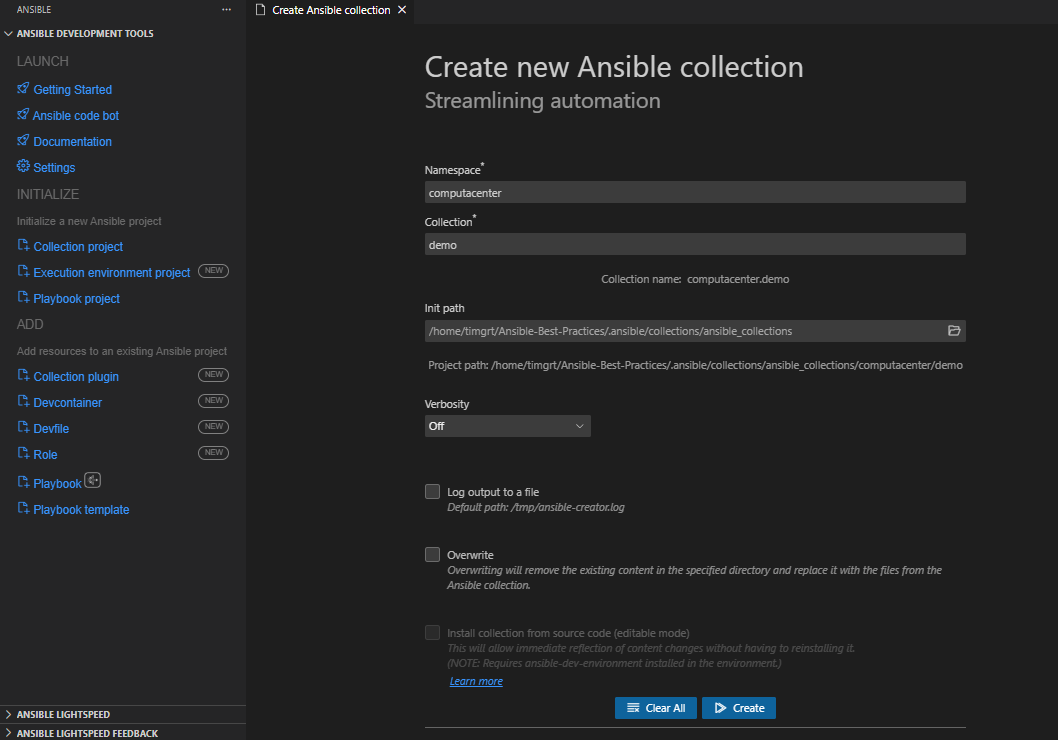
To initialize the collection with the VScode Ansible extension, select the extension, click Collection project, enter namespace and collection name, specify the destination directory and click Create.
Playbooks in collections
Although collections are primarily intended to distribute roles, modules, and plugins, you can include playbooks in a collection. Neither the ansible-galaxy nor the ansible-creator utility create a playbooks folder, so you need to create it manually and add your playbooks there.
Collection structure with playbooks folder
---
config:
  treeView:
    rowIndent: 20
    defaultIconPack: vscode-icons
    showIcons: true
    extensionIcons:
      .md: file-type-markdown
      .yml: file-type-light-yaml-official
---
treeView-beta
computacenter/
└── demo/
    ├── docs/
    ├── galaxy.yml
    ├── meta/
    │   └── runtime.yml
    ├── plugins/
    │   └── README.md
    ├── README.md
    ├── roles/
    └── playbooks/ :::highlight ## all collection playbooks must be placed in this folder
        └── example.yml
When adding a playbook, you should use a variable for the hosts parameter (with the all group as the default), so the playbook can be used in different environments.
---
- name: Deploy Webserver with welcome message
  hosts: "{{ managed_nodes | default('all') }}"
  become: true
  roles:
    - computacenter.demo.webserver
Now, you can overwrite the hosts variable when executing the playbook:
Using collection playbooks and roles
Roles and playbooks from collection can be used in the same way as roles and playbooks from a standalone project, only the Fully Qualified Collection Name (FQCN) must be used.
Tip
You don't need the .yml extension.
Execute a collection playbook:
Use a collection playbook in a playbook with import_playbook:
Reference a collection role in a playbook: