Logging
By default, Ansible sends output about plays, tasks, and module arguments to stdout on the control node, no log file is written.
This section describes different options to enable logging.
Tip
Add your log files or folders to .gitignore!
In most cases those files to not need to be version-controlled.
All log files are written on the Control Node.
Logging with ansible-core
To enable logging, in most cases you'll need to adjust the ansible.cfg file. With the help of Notification callback plugins output can be written to external systems like Splunk, Elastic or others. Additionally, those plugins can be used to send emails or Slack notifications.
Single log file
For a single log file use the log_path parameter in the defaults section.
Warning
The path (here the folder logs) to the log file must exist!
You'll get a warning, if the log file is not writable as the path does not exist or permissions are insufficient.
$ ansible-playbook facts.yml
[WARNING]: log file at '/home/timgrt/demo/logs/ansible.log' is not writable and we cannot create it, aborting

PLAY [Gather facts from all managed nodes] *********************************************

TASK [Gathering Facts] *****************************************************************
ok: [node1]
ok: [node3]
ok: [node2]
2026-03-14 10:28:06,753 p=36222 u=timgrt n=ansible INFO| PLAY [Gather facts from all managed nodes] ***************************************************************************
2026-03-14 10:28:06,774 p=36222 u=timgrt n=ansible INFO| TASK [Gathering Facts] ***********************************************************************************************
2026-03-14 10:28:08,565 p=36222 u=timgrt n=ansible INFO| ok: [node3]
2026-03-14 10:28:08,574 p=36222 u=timgrt n=ansible INFO| ok: [node2]
2026-03-14 10:28:08,584 p=36222 u=timgrt n=ansible INFO| ok: [node1]
2026-03-14 10:28:08,586 p=36222 u=timgrt n=ansible INFO| PLAY RECAP ***********************************************************************************************************
2026-03-14 10:28:08,586 p=36222 u=timgrt n=ansible INFO| node1                      : ok=1    changed=0    unreachable=0    failed=0    skipped=0    rescued=0    ignored=0
2026-03-14 10:28:08,586 p=36222 u=timgrt n=ansible INFO| node2                      : ok=1    changed=0    unreachable=0    failed=0    skipped=0    rescued=0    ignored=0
2026-03-14 10:28:08,586 p=36222 u=timgrt n=ansible INFO| node3                      : ok=1    changed=0    unreachable=0    failed=0    skipped=0    rescued=0    ignored=0
Every playbook run is appended to the log file.
Multiple, host-specific log files
To write multiple log files, one per host, you can use the community.general.log_plays plugin.
Install the collection:
Whitelist the callback plugin with the callbacks_enabled parameter in the defaults section and configure the log folder in a callback_log_plays section, if necessary.
Warning
By default, the plugin writes to the /var/log/ansible/hosts directory.
[defaults]
callbacks_enabled = community.general.log_plays

[callback_log_plays]
log_folder = logs/hosts
If the permissions allow it, the plugin will create the log_folder, it does not need to be created manually.
Under the hosts folder, separate files are created with the inventory_hostname of the targeted managed node.
Mar 14 2026 11:58:14 - create-workshop-environment.yml - Gathering Facts - gather_facts - OK - omitted

Mar 14 2026 11:58:48 - create-workshop-environment.yml - Install rsyslog - ansible.builtin.package - OK - {"module_args": {"name": ["rsyslog"], "state": "present", "allow_downgrade": false, "allowerasing": false, "autoremove": false, "bugfix": false, "cacheonly": false, "disable_gpg_check": false, "disable_plugin": [], "disablerepo": [], "download_only": false, "enable_plugin": [], "enablerepo": [], "exclude": [], "installroot": "/", "install_repoquery": true, "install_weak_deps": true, "security": false, "skip_broken": false, "update_cache": false, "update_only": false, "validate_certs": true, "sslverify": true, "lock_timeout": 30, "use_backend": "auto", "best": null, "conf_file": null, "disable_excludes": null, "download_dir": null, "list": null, "nobest": null, "releasever": null}} => {"msg": "", "changed": true, "results": ["Installed: libfastjson-0.99.9-5.el9.x86_64", "Installed: logrotate-3.18.0-12.el9.x86_64", "Installed: libestr-0.1.11-4.el9.x86_64", "Installed: rsyslog-8.2506.0-2.el9.x86_64", "Installed: rsyslog-logrotate-8.2506.0-2.el9.x86_64"], "rc": 0, "_ansible_no_log": false}

Mar 14 2026 11:58:56 - create-workshop-environment.yml - Start rsyslog - ansible.builtin.service - OK - {"module_args": {"name": "rsyslog", "state": "started", "daemon_reload": false, "daemon_reexec": false, "scope": "system", "no_block": false, "enabled": null, "force": null, "masked": null}} => {"name": "rsyslog", "changed": true, "status": {"Type": "notify", "ExitType": "main", "Restart": "on-failure", "NotifyAccess": "main", "RestartUSec": "100ms", "TimeoutStartUSec": "1min 30s", "TimeoutStopUSec": "1min 30s", "TimeoutAbortUSec": "1min 30s", "TimeoutStartFailureMode": "terminate", "TimeoutStopFailureMode": "terminate", "RuntimeMaxUSec": "infinity", "RuntimeRandomizedExtraUSec": "0", "WatchdogUSec": "infinity", "WatchdogTimestampMonotonic": "0", "RootDirectoryStartOnly": "no", "RemainAfterExit": "no", "GuessMainPID": "yes", "MainPID": "0", "ControlPID": "0", "FileDescriptorStoreMax": "0", "NFileDescriptorStore": "0", "StatusErrno": "0", "Result": "success", "ReloadResult": "success", "CleanResult": "success", "UID": "[not set]", "GID": "[not set]", "NRestarts": "0", "OOMPolicy": "stop", "ReloadSignal": "1", "ExecMainStartTimestampMonotonic": "0", "ExecMainExitTimestampMonotonic": "0", "ExecMainPID": "0", "ExecMainCode": "0", "ExecMainStatus": "0", "ExecStart": "{ path=/usr/sbin/rsyslogd ; argv[]=/usr/sbin/rsyslogd -n $SYSLOGD_OPTIONS ; ignore_errors=no ; start_time=[n/a] ; stop_time=[n/a] ; pid=0 ; code=(null) ; status=0/0 }", "ExecStartEx": "{ path=/usr/sbin/rsyslogd ; argv[]=/usr/sbin/rsyslogd -n $SYSLOGD_OPTIONS ; flags= ; start_time=[n/a] ; stop_time=[n/a] ; pid=0 ; code=(null) ; status=0/0 }", "ExecReload": "{ path=/usr/bin/kill ; argv[]=/usr/bin/kill -HUP $MAINPID ; ignore_errors=no ; start_time=[n/a] ; stop_time=[n/a] ; pid=0 ; code=(null) ; status=0/0 }", "ExecReloadEx": "{ path=/usr/bin/kill ; argv[]=/usr/bin/kill -HUP $MAINPID ; flags= ; start_time=[n/a] ; stop_time=[n/a] ; pid=0 ; code=(null) ; status=0/0 }", "Slice": "system.slice", "ControlGroupId": "0", "MemoryCurrent": "[not set]", "MemoryAvailable": "infinity", "CPUUsageNSec": "[not set]", "TasksCurrent": "[not set]", "IPIngressBytes": "[no data]", "IPIngressPackets": "[no data]", "IPEgressBytes": "[no data]", "IPEgressPackets": "[no data]", "IOReadBytes": "18446744073709551615", "IOReadOperations": "18446744073709551615", "IOWriteBytes": "18446744073709551615", "IOWriteOperations": "18446744073709551615", "Delegate": "no", "CPUAccounting": "yes", "CPUWeight": "[not set]", "StartupCPUWeight": "[not set]", "CPUShares": "[not set]", "StartupCPUShares": "[not set]", "CPUQuotaPerSecUSec": "infinity", "CPUQuotaPeriodUSec": "infinity", "IOAccounting": "no", "IOWeight": "[not set]", "StartupIOWeight": "[not set]", "BlockIOAccounting": "no", "BlockIOWeight": "[not set]", "StartupBlockIOWeight": "[not set]", "MemoryAccounting": "yes", "DefaultMemoryLow": "0", "DefaultMemoryMin": "0", "MemoryMin": "0", "MemoryLow": "0", "MemoryHigh": "infinity", "MemoryMax": "infinity", "MemorySwapMax": "infinity", "MemoryLimit": "infinity", "DevicePolicy": "auto", "TasksAccounting": "yes", "TasksMax": "1638", "IPAccounting": "no", "ManagedOOMSwap": "auto", "ManagedOOMMemoryPressure": "auto", "ManagedOOMMemoryPressureLimit": "0", "ManagedOOMPreference": "none", "EnvironmentFiles": "/etc/sysconfig/rsyslog (ignore_errors=yes)", "UMask": "0066", "LimitCPU": "infinity", "LimitCPUSoft": "infinity", "LimitFSIZE": "infinity", "LimitFSIZESoft": "infinity", "LimitDATA": "infinity", "LimitDATASoft": "infinity", "LimitSTACK": "infinity", "LimitSTACKSoft": "8388608", "LimitCORE": "infinity", "LimitCORESoft": "0", "LimitRSS": "infinity", "LimitRSSSoft": "infinity", "LimitNOFILE": "16384", "LimitNOFILESoft": "16384", "LimitAS": "infinity", "LimitASSoft": "infinity", "LimitNPROC": "63469", "LimitNPROCSoft": "63469", "LimitMEMLOCK": "67108864", "LimitMEMLOCKSoft": "67108864", "LimitLOCKS": "infinity", "LimitLOCKSSoft": "infinity", "LimitSIGPENDING": "63469", "LimitSIGPENDINGSoft": "63469", "LimitMSGQUEUE": "819200", "LimitMSGQUEUESoft": "819200", "LimitNICE": "0", "LimitNICESoft": "0", "LimitRTPRIO": "0", "LimitRTPRIOSoft": "0", "LimitRTTIME": "infinity", "LimitRTTIMESoft": "infinity", "OOMScoreAdjust": "0", "CoredumpFilter": "0x33", "Nice": "0", "IOSchedulingClass": "2", "IOSchedulingPriority": "4", "CPUSchedulingPolicy": "0", "CPUSchedulingPriority": "0", "CPUAffinityFromNUMA": "no", "NUMAPolicy": "n/a", "TimerSlackNSec": "50000", "CPUSchedulingResetOnFork": "no", "NonBlocking": "no", "StandardInput": "null", "StandardOutput": "null", "StandardError": "inherit", "TTYReset": "no", "TTYVHangup": "no", "TTYVTDisallocate": "no", "SyslogPriority": "30", "SyslogLevelPrefix": "yes", "SyslogLevel": "6", "SyslogFacility": "3", "LogLevelMax": "-1", "LogRateLimitIntervalUSec": "0", "LogRateLimitBurst": "0", "SecureBits": "0", "CapabilityBoundingSet": "cap_chown cap_dac_override cap_dac_read_search cap_fowner cap_fsetid cap_kill cap_setgid cap_setuid cap_setpcap cap_linux_immutable cap_net_bind_service cap_net_broadcast cap_net_admin cap_net_raw cap_ipc_lock cap_ipc_owner cap_sys_rawio cap_sys_chroot cap_sys_ptrace cap_sys_pacct cap_sys_admin cap_sys_boot cap_sys_nice cap_sys_resource cap_sys_time cap_sys_tty_config cap_mknod cap_lease cap_audit_write cap_audit_control cap_setfcap cap_mac_override cap_mac_admin cap_syslog cap_wake_alarm cap_block_suspend cap_audit_read cap_perfmon cap_bpf cap_checkpoint_restore", "DynamicUser": "no", "RemoveIPC": "no", "PrivateTmp": "no", "PrivateDevices": "no", "ProtectClock": "no", "ProtectKernelTunables": "yes", "ProtectKernelModules": "yes", "ProtectKernelLogs": "no", "ProtectControlGroups": "yes", "PrivateNetwork": "no", "PrivateUsers": "no", "PrivateMounts": "no", "PrivateIPC": "no", "ProtectHome": "read-only", "ProtectSystem": "no", "SameProcessGroup": "no", "UtmpMode": "init", "IgnoreSIGPIPE": "yes", "NoNewPrivileges": "yes", "SystemCallFilter": "~_sysctl adjtimex afs_syscall bdflush break clock_adjtime clock_adjtime64 clock_settime clock_settime64 create_module delete_module finit_module ftime get_kernel_syms getpmsg gtty idle init_module ioperm iopl kexec_file_load kexec_load lock lookup_dcookie modify_ldt mpx pciconfig_iobase pciconfig_read pciconfig_write perf_event_open pidfd_getfd prof profil ptrace putpmsg query_module reboot rtas s390_pci_mmio_read s390_pci_mmio_write s390_runtime_instr security settimeofday sgetmask ssetmask stime stty subpage_prot swapoff swapon switch_endian sysfs tuxcall ulimit uselib ustat vm86 vm86old vserver", "SystemCallArchitectures": "native", "SystemCallErrorNumber": "2147483646", "LockPersonality": "yes", "RestrictAddressFamilies": "AF_INET AF_INET6 AF_UNIX", "RuntimeDirectoryPreserve": "no", "RuntimeDirectoryMode": "0755", "StateDirectoryMode": "0755", "CacheDirectoryMode": "0755", "LogsDirectoryMode": "0755", "ConfigurationDirectoryMode": "0755", "TimeoutCleanUSec": "infinity", "MemoryDenyWriteExecute": "yes", "RestrictRealtime": "no", "RestrictSUIDSGID": "yes", "RestrictNamespaces": "net", "MountAPIVFS": "no", "KeyringMode": "private", "ProtectProc": "default", "ProcSubset": "all", "ProtectHostname": "no", "KillMode": "control-group", "KillSignal": "15", "RestartKillSignal": "15", "FinalKillSignal": "9", "SendSIGKILL": "yes", "SendSIGHUP": "no", "WatchdogSignal": "6", "Id": "rsyslog.service", "Names": "rsyslog.service", "Requires": "system.slice sysinit.target", "Wants": "network.target network-online.target", "WantedBy": "multi-user.target", "Conflicts": "shutdown.target", "Before": "shutdown.target multi-user.target", "After": "basic.target system.slice network-online.target network.target sysinit.target", "Documentation": "\"man:rsyslogd(8)\" https://www.rsyslog.com/doc/", "Description": "System Logging Service", "LoadState": "loaded", "ActiveState": "inactive", "FreezerState": "running", "SubState": "dead", "FragmentPath": "/usr/lib/systemd/system/rsyslog.service", "UnitFileState": "enabled", "UnitFilePreset": "enabled", "StateChangeTimestampMonotonic": "0", "InactiveExitTimestampMonotonic": "0", "ActiveEnterTimestampMonotonic": "0", "ActiveExitTimestampMonotonic": "0", "InactiveEnterTimestampMonotonic": "0", "CanStart": "yes", "CanStop": "yes", "CanReload": "yes", "CanIsolate": "no", "CanFreeze": "yes", "StopWhenUnneeded": "no", "RefuseManualStart": "no", "RefuseManualStop": "no", "AllowIsolate": "no", "DefaultDependencies": "yes", "OnSuccessJobMode": "fail", "OnFailureJobMode": "replace", "IgnoreOnIsolate": "no", "NeedDaemonReload": "no", "JobTimeoutUSec": "infinity", "JobRunningTimeoutUSec": "infinity", "JobTimeoutAction": "none", "ConditionResult": "no", "AssertResult": "no", "ConditionTimestampMonotonic": "0", "AssertTimestampMonotonic": "0", "Transient": "no", "Perpetual": "no", "StartLimitIntervalUSec": "10s", "StartLimitBurst": "5", "StartLimitAction": "none", "FailureAction": "none", "SuccessAction": "none", "CollectMode": "inactive"}, "state": "started", "_ansible_no_log": false}
Create multiple, playbook-specific log files
To create separate log files with timestamp per playbook run, you'll need to provide/adjust the ANSIBLE_LOG_PATH environment variable with every playbook run.
Warning
The path (here the folder logs) to the log file must exist!
Prepend the ansible-playbook utility with the environment variable:
To simplify the CLI command, create an alias for the command, for example in ~/.bash_aliases
alias ansible-playbook='ANSIBLE_LOG_PATH=logs/playbook.$(date +%Y%m%d-%HH%MM%SS).log ansible-playbook'
Source the file to activate the alias:
Now, with every playbook run, a log file is written.
2026-03-14 12:23:17,339 p=108181 u=timgrt n=ansible INFO| PLAY [Gather facts from all managed nodes] **************************************************************************
2026-03-14 12:23:17,376 p=108181 u=timgrt n=ansible INFO| TASK [Gathering Facts] **********************************************************************************************
2026-03-14 12:23:19,293 p=108181 u=timgrt n=ansible INFO| ok: [node2]
2026-03-14 12:23:19,371 p=108181 u=timgrt n=ansible INFO| ok: [node1]
2026-03-14 12:23:19,413 p=108181 u=timgrt n=ansible INFO| ok: [node3]
2026-03-14 12:23:19,415 p=108181 u=timgrt n=ansible INFO| PLAY RECAP **********************************************************************************************************
2026-03-14 12:23:19,415 p=108181 u=timgrt n=ansible INFO| node1                      : ok=1    changed=0    unreachable=0    failed=0    skipped=0    rescued=0    ignored=0
2026-03-14 12:23:19,415 p=108181 u=timgrt n=ansible INFO| node2                      : ok=1    changed=0    unreachable=0    failed=0    skipped=0    rescued=0    ignored=0
2026-03-14 12:23:19,415 p=108181 u=timgrt n=ansible INFO| node3                      : ok=1    changed=0    unreachable=0    failed=0    skipped=0    rescued=0    ignored=0
Logging with ansible-navigator
By default, ansible-navigator always creates log files.
Two kinds of logs are created, a general ansible-navigator.log file and playbook artifact files, which contain the actual log of every playbook run.
Without adjusting the ansible-navigator.yml configuration all log and artifact files are written to the current working directory (which gets messy pretty quick).
Use the following configuration which writes all files to a separate logs folder:
Info
The logs folder is created by the Navigator, it does not need to be created manually.
The logs are written in JSON, no other format is available!
---
ansible-navigator:
  execution-environment:
    enabled: false # (1)!
  format: yaml # (2)!
  logging:
    level: warning # (3)!
    file: logs/ansible-navigator.log
  mode: stdout # (4)!
  playbook-artifact:
    save-as: "logs/{playbook_status}-{playbook_name}-{time_stamp}.json" # (5)!
- When the usage of Execution Environments is disabled, the local
ansible-corebinary is used. - This will only change the
stdoutformat from JSON to YAML, the log files are always in JSON format! - Choose an appropriate log level from
info,warning,error,criticalup todebughere or use the CLI parameter, e.g.--log-level debug. - This changes the Navigator mode from the
interactiveTUI to the classicstdout(as if usingansible-playbook). - This will create log files like
logs/successful-rsyslog-install-2026-03-24T10:41:22.208723+00:00.jsonorlogs/failed-rsyslog-install-2026-03-24T10:35:10.125672+00:00.json.
The playbook artifact filenames will contain the overall state, the name of the playbook (e.g. *-rsyslog-install-* when executing rsyslog-install.yml) and a timestamp.
Example
An example output with the general Navigator log and playbook artifacts of a successful and a failed run.
Inspect/Replay log artifacts
Playbook artifact files are written in JSON format, which is inconvenient to read. You can use the replay functionality to repeat the playbook output. The playbook will not be run again, only the output will be shown to stdout again:
$ ansible-navigator replay logs/successful-rsyslog-install-2026-03-24T10:10:42.054696+00:00.json

PLAY [Install and start rsyslog on all managed nodes] **************************

TASK [Gathering Facts] *********************************************************
ok: [node3]
ok: [node2]
ok: [node1]

TASK [Install rsyslog] *********************************************************
ok: [node1]
ok: [node2]
changed: [node3]

TASK [Start rsyslog] ***********************************************************
ok: [node2]
changed: [node3]
ok: [node1]

PLAY RECAP *********************************************************************
node1                      : ok=3    changed=0    unreachable=0    failed=0    skipped=0    rescued=0    ignored=0
node2                      : ok=3    changed=0    unreachable=0    failed=0    skipped=0    rescued=0    ignored=0
node3                      : ok=3    changed=2    unreachable=0    failed=0    skipped=0    rescued=0    ignored=0
To inspect the playbook artifact even further (inspecting/debugging single tasks), use the interactive (TUI) mode:
- The interactive mode is the default mode, if you configured the mode to
stdoutin theansible-navigator.ymlconfiguration file, you'll need to provide the mode.
Example
The interactive mode gives an overview of available commands.
Copy the path to the playbook artifact. Type :replay logs/successful-rsyslog-install-2026-03-24T10:10:42.054696+00:00.json (see last line) utilizing the copied path and hit Enter.
 0│Welcome
 1│————————————————————————————————————————————————————————————————————————————————————————————————————————————————————————————————————
 2│
 3│Some things you can try from here:
 4│- :collections                                    Explore available collections
 5│- :config                                         Explore the current ansible configuration
 6│- :doc <plugin>                                   Review documentation for a module or plugin
 7│- :help                                           Show the main help page
 8│- :images                                         Explore execution environment images
 9│- :inventory -i <inventory>                       Explore an inventory
10│- :log                                            Review the application log
11│- :lint <file or directory>                       Lint Ansible/YAML files (experimental)
12│- :open                                           Open current page in the editor
13│- :replay                                         Explore a previous run using a playbook artifact
14│- :run <playbook> -i <inventory>                  Run a playbook in interactive mode
15│- :settings                                       Review the current ansible-navigator settings
16│- :quit                                           Quit the application
17│
18│happy automating,
19│
20│-winston


:replay logs/successful-rsyslog-install-2026-03-24T10:10:42.054696+00:00.json
You'll see an overview of all plays of the playbook run. Navigate by providing the line ID. Click 0.
Play name                                            Ok Changed  Unreachable   Failed  Skipped  Ignored  In progress   Task count     Progress
0│Install and start rsyslog on all managed nodes        9       2            0        0        0        0            0            9     Complete


^b/PgUp page up           ^f/PgDn page down           ↑↓ scroll           esc back           [0-9] goto           :help help         Successful
Result       Host       Number       Changed        Task                         Task action                                 Duration
0│Ok           node1           0       False          Gathering Facts              gather_facts                                      4s
1│Ok           node2           1       False          Gathering Facts              gather_facts                                      4s
2│Ok           node3           2       False          Gathering Facts              gather_facts                                      4s
3│Ok           node1           3       False          Install rsyslog              ansible.builtin.package                           4s
4│Ok           node2           4       False          Install rsyslog              ansible.builtin.package                           4s
5│Ok           node3           5       True           Install rsyslog              ansible.builtin.package                           5s
6│Ok           node1           6       False          Start rsyslog                ansible.builtin.service                           3s
7│Ok           node2           7       False          Start rsyslog                ansible.builtin.service                           3s
8│Ok           node3           8       True           Start rsyslog                ansible.builtin.service                           3s


^b/PgUp page up           ^f/PgDn page down           ↑↓ scroll           esc back           [0-9] goto           :help help         Successful
To inspect the debug output of ID 5 (Changed state on node3 in the Install rsyslog task, which utilized the ansible.builtin.package module), click 5:
Play name: Install and start rsyslog on all managed nodes:5
Task name: Install rsyslog
CHANGED: node3
52│      skip_broken: false
53│      sslverify: true
54│      state: present
55│      update_cache: false
56│      update_only: false
57│      use_backend: auto
58│      validate_certs: true
59│  msg: ''
60│  rc: 0
61│  results:
62│  - 'Installed: libfastjson-0.99.9-5.el9.x86_64'
63│  - 'Installed: logrotate-3.18.0-12.el9.x86_64'
64│  - 'Installed: libestr-0.1.11-4.el9.x86_64'
65│  - 'Installed: rsyslog-8.2506.0-2.el9.x86_64'
66│  - 'Installed: rsyslog-logrotate-8.2506.0-2.el9.x86_64'                                                                                     ▒
67│resolved_action: ansible.builtin.package                                                                                                     ▒
68│start: '2026-03-24T10:10:33.353778+00:00'                                                                                                    ▒
69│task: Install rsyslog                                                                                                                        ▒
70│task_action: ansible.builtin.package                                                                                                         ▒
71│task_args: ''                                                                                                                                ▒
72│task_path: /home/timgrt/anwendertreffen-03-2026-demo/rsyslog-install.yml:5                                                                   ▒
^b/PgUp page up      ^f/PgDn page down      ↑↓ scroll      esc back      - previous      + next      [0-9] goto      :help help      Successful
You can now see the debug output, although you never enabled verbosity or added a task with the ansible.builtin.debug module!
Logging in AAP
The Ansible Automation Platform logs all Job outputs by default in the underlying Postgres database and can be viewed in the UI.
Logs can (and should) be send to third-party external log aggregation services. The following loggers are available:
| Logger | Description |
|---|---|
job_events |
Provides data returned from the Ansible callback module. |
activity_stream |
Displays the record of changes to the objects within the application. |
system_tracking |
Provides fact data gathered by Ansible setup module, when job templates are run with Enable Fact Cache selected. |
awx |
Provides generic server logs, which include logs that would normally be written to a file. |
Take a look at the Automation Platform section for additional information.
Specialised logging solution
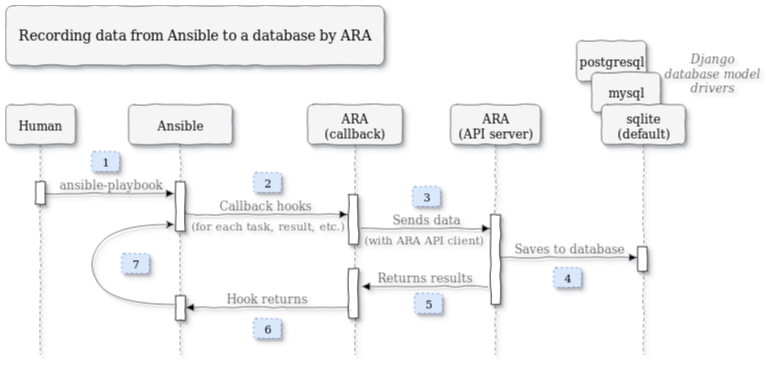
ARA (an acronym: ARA records Ansible) provides logging by recording ansible and ansible-playbook commands regardless of how and where they run, even from tools that run Ansible like ansible-(pull|test|runner|navigator), AWX & Automation Controller (Tower), Molecule and Semaphore.
The recorded results are available via an included CLI, a REST API as well as a self-hosted, local-first web reporting interface.
Results are written to SQLite, MySQL or a PostgreSQL databases with a standard callback plugin. This plugin gathers data as Ansible runs and sends it to a Django REST API server.
ara records to a local sqlite database by default and does not require a persistent server.
A preview of the ARA Web-UI is available in a live demo.
ARA Installation
Install the ARA package alongside ansible-core, here including the API server dependencies:
To install the API server, take a look at the ARA documentation and/or use the ara Ansible collection from Ansible Galaxy.
ARA configuration
Either export the environment variables or adjust the ansible.cfg.
To print the export commands use the following:
Example output
$ python3 -m ara.setup.env
export ANSIBLE_CALLBACK_PLUGINS=${ANSIBLE_CALLBACK_PLUGINS:-}${ANSIBLE_CALLBACK_PLUGINS+:}/home/timgrt/demo/ve-ara/lib/python3.12/site-packages/ara/plugins/callback
export ANSIBLE_ACTION_PLUGINS=${ANSIBLE_ACTION_PLUGINS:-}${ANSIBLE_ACTION_PLUGINS+:}/home/timgrt/demo/ve-ara/lib/python3.12/site-packages/ara/plugins/action
export ANSIBLE_LOOKUP_PLUGINS=${ANSIBLE_LOOKUP_PLUGINS:-}${ANSIBLE_LOOKUP_PLUGINS+:}/home/timgrt/demo/ve-ara/lib/python3.12/site-packages/ara/plugins/lookup
export PYTHONPATH=${PYTHONPATH:-}${PYTHONPATH+:}/home/timgrt/demo/ve-ara/lib/python3.12/site-packages
To export directly from the command, use:
You can also set the plugin adjustments in the ansible.cfg, but this is not very portable as the path to the local Python installation is used:
[defaults]
callback_plugins=/home/timgrt/demo/ve-ara/lib/python3.12/site-packages/ara/plugins/callback
action_plugins=/home/timgrt/demo/ve-ara/lib/python3.12/site-packages/ara/plugins/action
lookup_plugins=/home/timgrt/demo/ve-ara/lib/python3.12/site-packages/ara/plugins/lookup
Now, run an Ansible playbook as usual (e.g. ansible-playbook playbook.yml).
ARA Usage
The ARA CLI utility can be used to view the logs, use ara --help to show all available commands.
To view a list of all playbooks:
Example output
$ ara playbook list
+----+-----------+---------------------+--------+-----------------+---------------------------------------+-------+---------+-------+-----------------------------+-----------------+
| id | status    | controller          | user   | ansible_version | path                                  | tasks | results | hosts | started                     | duration        |
+----+-----------+---------------------+--------+-----------------+---------------------------------------+-------+---------+-------+-----------------------------+-----------------+
|  3 | completed | Desktop.localdomain | timgrt | 2.20.3          | ...home/timgrt/demo/facts.yml         |     1 |       3 |     3 | 2026-03-18T18:36:12.332483Z | 00:00:02.219081 |
|  2 | completed | Desktop.localdomain | timgrt | 2.20.3          | ...create-workshop-environment.yml    |    11 |      23 |     4 | 2026-03-18T18:34:29.491862Z | 00:00:58.633736 |
|  1 | completed | Desktop.localdomain | timgrt | 2.20.3          | ...timgrt/demo/playbook.yml           |     4 |       4 |     1 | 2026-03-18T18:32:08.577663Z | 00:00:02.320743 |
+----+-----------+---------------------+--------+-----------------+---------------------------------------+-------+---------+-------+-----------------------------+-----------------+
You can drill down into specific entries with the id (e.g. ara playbook show 3)
To view a list of all targeted hosts:
Example output
$ ara host metrics
+-----------+-------+---------+--------+----+---------+-------------+
| name      | count | changed | failed | ok | skipped | unreachable |
+-----------+-------+---------+--------+----+---------+-------------+
| localhost |     2 |       3 |      0 |  8 |       1 |           0 |
| node1     |     2 |       4 |      0 |  7 |       0 |           0 |
| node2     |     2 |       4 |      0 |  7 |       0 |           0 |
| node3     |     2 |       4 |      0 |  7 |       0 |           0 |
+-----------+-------+---------+--------+----+---------+-------------+
The count shows how often the host was targeted.
If the ARA API Server dependencies are installed, you can start a local UI server to inspect the logs:
Protecting sensitive data from logging
Most modules obfuscate passwords, if you save Ansible output to a log, you may expose any secret data in your Ansible output.
To keep sensitive values out of your logs, mark tasks that expose them with the no_log: true attribute.